Yep, that’s right. Good ol’ Excel. I’ll be honest – I scoffed at the thought of Excel being beneficial to my budgeting wants and needs but truthfully it has been by far the most helpful. In our day and age of fast and ever evolving tech; Excel seems like a dinosaur.
I tried and failed a few times to create my own excel sheet. Thankfully I came across a financial guru who gave me this:
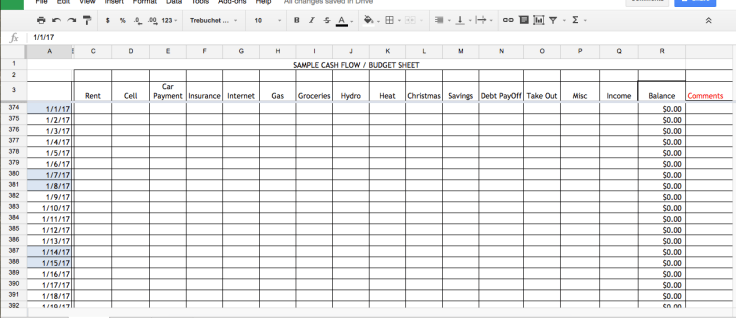 Looks super basic and boring right? No way this can be life-changing. Well, for those of us who survive paycheque to paycheque it totally is.
The first step is to put your current bank account balance in the very first balance column. That’s the only time you will do any inputting to that column because it will calculate itself from here on out. Let’s say you currently have $500 in the bank account to last until your next pay day. But before then, you also have to get some gas, groceries and pay your phone bill. So go ahead and put those expenses in on the days you expect to pay them. Personally I like to hi-light the cells yellow once I’ve spent the money just so I know it is done and gone and there is no changing that.
So this is what it will look like until payday. I’ve also gone ahead and added my next pay that’s coming in and the following expenses coming up that next week.
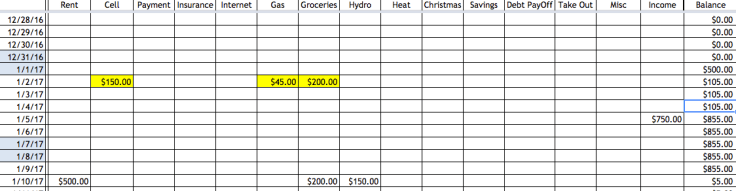
Looks great, my balance shows that I’ve got $105 cushion until pay day. So I figure to my self ‘I have a $105 cushion to last until pay day – I think I’ll treat myself to some McDonald’s for the family”. Once I’ve gone out and purchased and devoured the deliciousness I come home and put that expense into my excel sheet. Lo and behold, the repercussions. Sure, I’m still totally fine until payday but I can already see that into the next week I’ll be in the hole because my balance column updates to the big bad red.
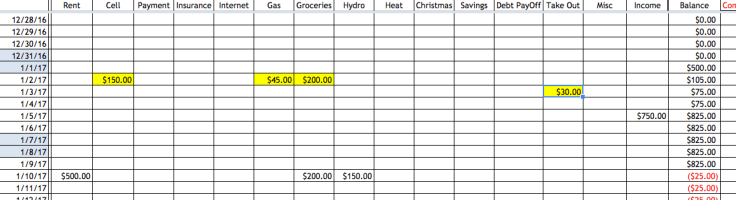
This way I can see in advance that because I chose to get that McDonald’s I’m going to have adjust the rest of my budget. So I’ll change my grocery budget to $150 and if I stick to that I’m still in the black.
With this approach there is a bit of inital set up because ideally you should enter months of expected expenses and income in advance. You have car stickers coming due in April – put them in for their due date. Insurance premiums are paid every 6 months? Put them in on the due date.
After that just update it every 1-3 days (depending on how many daily transactions you have) and it takes all a couple minutes. I have it linked to my dropbox and update it on my excel app as soon as I spend the money.
Get in the habit of scrolling ahead a couple of months to see if any purchases today put you in the red down the line. I knew in November that if I stuck with my usual budget February was going to put me into the red. That gave me plenty of time to cut back on groceries and take out here and there and now February is comfortably in the black again.
You have to learn to essentially ignore your bank account balance. No longer look to that to make the decision if you have enough money for something. If you’re thinking about a purchase put the numbers in your excel sheet and see how that affects you one week, one month, six months down the line. It’s amazing to see how much a simple McDonald’s purchase can affect your budget months later if your finances are tight.
Before we used this our bills were NEVER paid on time. We were of the mind that we never had enough money so we just paid things as late as we could before they would cut us off. Most bills were 30, 60, even 90 days late. Now, our bills are always paid on time because I already have them in the excel sheet months ahead of time and if I’m in the red something else gets adjusted.
If you’d like a free template for this feel free to contact me and I’ll send you a link 🙂


 Out of the Woods Family Finances
Leave a comment